Function Step
The Function step runs automated logic in your workflow without needing a person to do anything. Use it when you need to call a service, transform data, send a notification, or perform any other background operation.
Configuring the Function Step
Click on the Function step in the canvas to open the properties panel on the right side.
- Select the function model you want to run. This is a function you have already created separately as a Workflow Function model.
- Set up input mappings to pass data from the workflow into the function.
- Set up output mappings to bring results from the function back into the workflow.
Available Steps Inside a Function
When you build a Workflow Function model, you can use any of the following steps to design your logic:
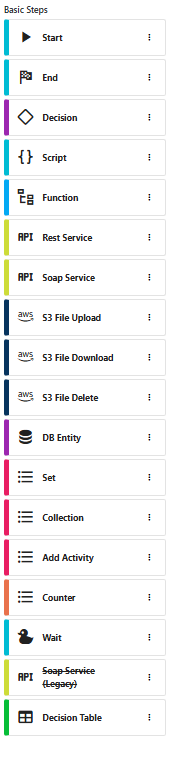
| Step | What It Does |
|---|---|
| Start / End | Every function begins with a Start and ends with an End step. |
| Decision | Adds conditional logic to branch the flow based on values. |
| Script | Write custom code to process data. |
| Function | Call another function model from within this one. |
| Rest Service | Call an external REST API. |
| Soap Service | Call an external SOAP service. |
| S3 File Upload / Download / Delete | Upload, download, or delete files from S3 storage. |
| DB Entity | Read from or write to database records. |
| Set | Assign values to variables. |
| Collection | Work with lists of data (filter, map, iterate). |
| Add Activity | Add an activity record to the process history. |
| Counter | Generate sequential numbers. |
| Wait | Pause execution for a specified time. |
| Decision Table | Evaluate rules defined in a decision table model. |
Data Mappings
The mapping configuration controls how information moves between your workflow and the function.
Input Mappings
Input mappings send data from the running process into the function. For each mapping, you specify:
- Variable -- the name of the function's input variable
- Source -- where in the workflow the value comes from
Output Mappings
Output mappings bring results from the function back into the workflow. For each mapping, you specify:
- Variable -- the name of the function's output variable
- Target -- where in the workflow to store the result
Common Uses
| Use Case | Example |
|---|---|
| Calling a service | Fetch customer data from an external API. |
| Transforming data | Calculate totals, convert formats, or enrich process data. |
| Sending notifications | Send a custom email or SMS outside the standard notification system. |
| Validating data | Run business rule checks before the process moves forward. |
| Updating external systems | Write data to another database or application. |