Nested Modules
In Plateau Studio, you can import a module inside another module. This helps you keep related screens, data models, workflows, and shared components together under the module where they are used.
Nested modules are useful when a shared module belongs to a specific business module instead of being shown directly under the application. They can be reused across multiple applications and modules. Multiple levels of module nesting are supported.
How To Import A Module Inside Another Module?
- Only version type shared modules can be imported by another module. Organization group modules are not yet supported for import.
Click the actions menu of the module. Click Import Module. Select the preferred version of another module. Click Import.
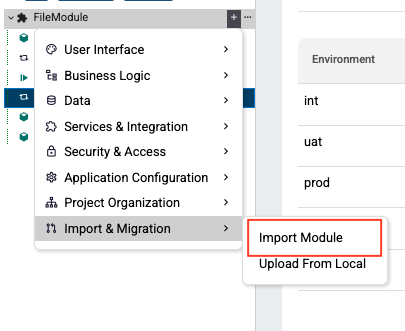
After a successful import, the nested module hierarchy can be shown in the explorer tree view. Models under imported modules will be read-only. You can change it through Override if you like.
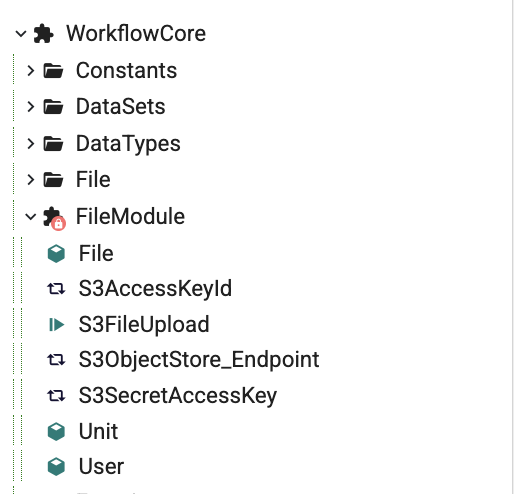
- A module cannot be imported into itself and it can be used only once in the same application. This means a module cannot be imported both directly under the application and inside another module.
How To Do Versioning?
Changes made to a shared module can be propagated to all modules that reference it after re-importing or updating. Updating nested modules version will be the same as module versioning behaviour.
To update the version, click the actions menu of the module. Click Version Settings. Select the preferred version. It will be automatically updated.
Deleting a parent module does not automatically delete shared modules used elsewhere.
Exporting a module automatically includes all required nested modules.