Business Key Generator
A Business Key is a friendly, readable label that gets attached to each process when a workflow starts. Instead of tracking processes by system-generated IDs, you can use meaningful references like an order number (ORD-20240315-001), a request ID, or a ticket code. This makes it much easier to find and follow a specific process in task lists and search results.
Overview
When someone starts a new workflow, the system can automatically generate a business key for that process. You set this up once on the workflow, and every new process gets its own unique key without any manual effort.
Setting Up Business Key Generation
To configure a business key generator, open your workflow's properties panel and locate the Business Key Generation Function section.
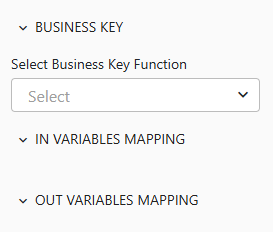
Here you will fill in three things:
| Setting | What to Do |
|---|---|
| Referenced flow | Pick the flow that will generate the key. This is a separate flow you create that contains the logic for producing a unique value. |
| Input mappings | Choose which data from the current workflow to send into the generation flow (for example, department name or request type). |
| Output mappings | Map the generated key back to the business key field. This tells the system where to store the result. |
Important: The output mapping must write to the business key field. If you skip this, you will see a validation error. The generation flow must also return a non-empty value, or the process will not start.
Common Patterns for Generating Keys
Below is an example of a business key generation flow. It uses a Counter step to get the next number in a sequence, then a Script step to format it into a readable key.
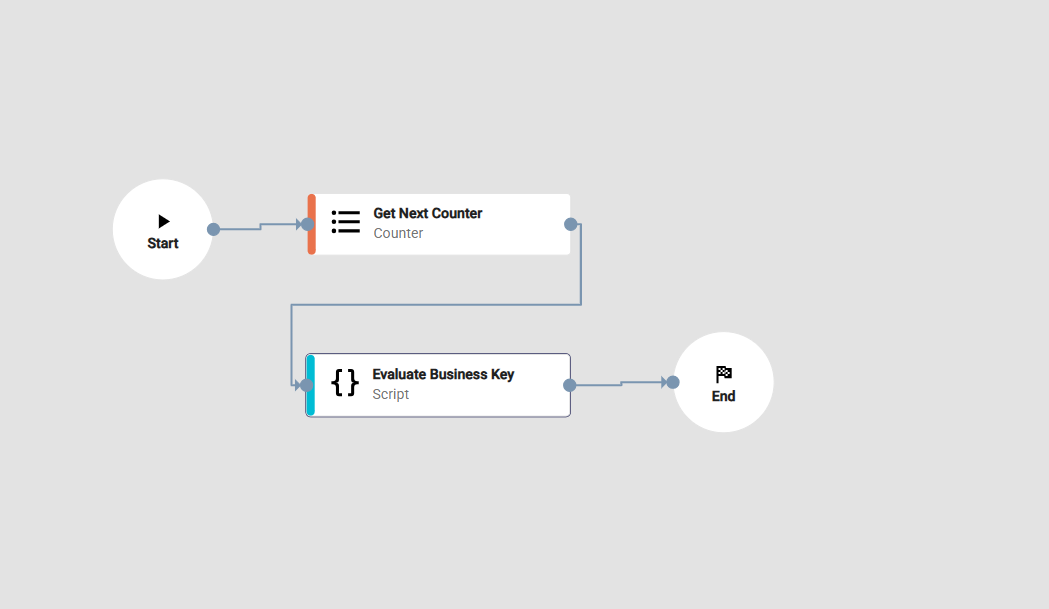
Your generation flow can produce keys in whatever format you need. Here are some common approaches:
- Sequential numbering -- Use a counter from a database or service, producing keys like
REQ-001,REQ-002, etc. - Date-based keys -- Combine the current date with a counter, such as
REQ-20240315-001. - Service-based generation -- Call an external service that returns unique identifiers.
Note: The business key is created once when the process starts and does not change. If you need to update it later, you can use a Function step to modify it.