Action Editor
The Action Editor is where you define actions — the buttons shown to users on a workflow User Task (e.g. Submit, Approve, Reject). An action is created from the left panel with + Add New → New Action. In the list view, ADD NEW opens the action detail page.
What Is an Action?
- An action is the button definition shown on a User Task.
- It is bound to a workflow function that runs when it is pressed, optionally to a form, and optionally to button-level privileges.
- The same action can be reused across many User Tasks.
What Is It For?
- To define a button's behavior once instead of repeating it on every User Task.
- To answer "who can press this button?" with action-level privileges. The button stays visible, but an unauthorized user is blocked from pressing it.
Editor Layout
The action detail page has the fields below.
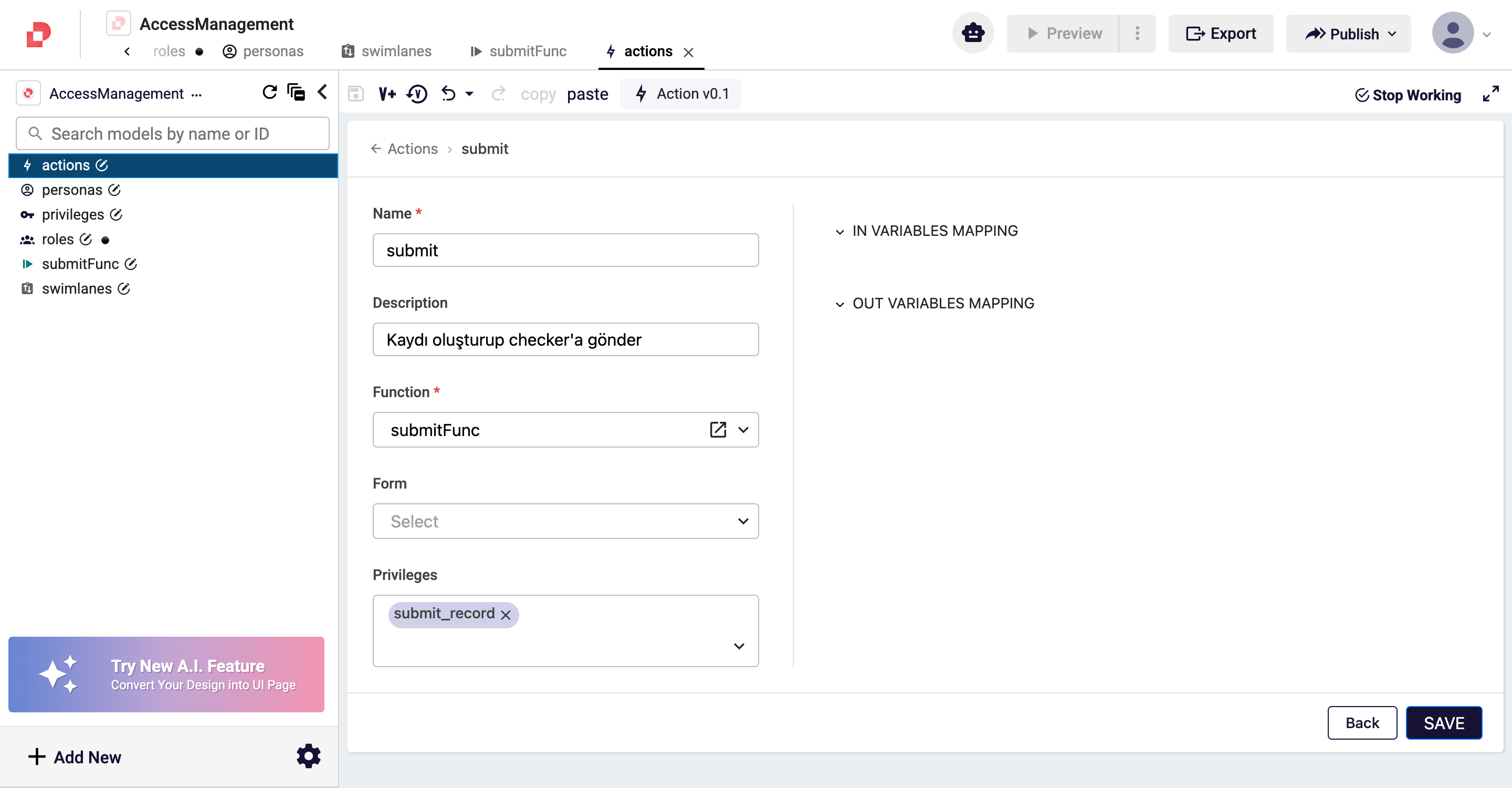
| Field | Description | Required |
|---|---|---|
| Name | The unique name of the action. | ✓ |
| Description | Explanation shown in Studio selection lists. | — |
| Function | The workflow function that runs when the action is pressed. The function must exist before it can be selected. | ✓ |
| Form | The qjson form the action opens or updates. | — |
| Privileges | The privileges required to press the action. | — |
info
Action privileges use AND logic — if several are assigned, the user must hold all of them. The privilege check runs before the function, so an unauthorized user cannot trigger it even if the button looks active.