Persona Editor
The Persona Editor is where you define personas — the set of role(s) a user carries at runtime. A persona is created from the left panel with + Add New → New Persona. In the list view, ADD NEW opens the persona detail page.
What Is a Persona?
- A persona tells the system "which hat" a user wears at runtime.
- It can carry one or more roles; at login, the privileges of every role in the persona become effective for the user.
- Each user record stores a
personaRefIdthat links the user to a persona.
What Is It For?
- To answer "which role(s) does this user have at runtime?"
- To bind roles to users through a persona instead of directly, which simplifies administration — change the persona's roles once instead of editing every user.
Editor Layout
The persona detail page is organized into the sections below.
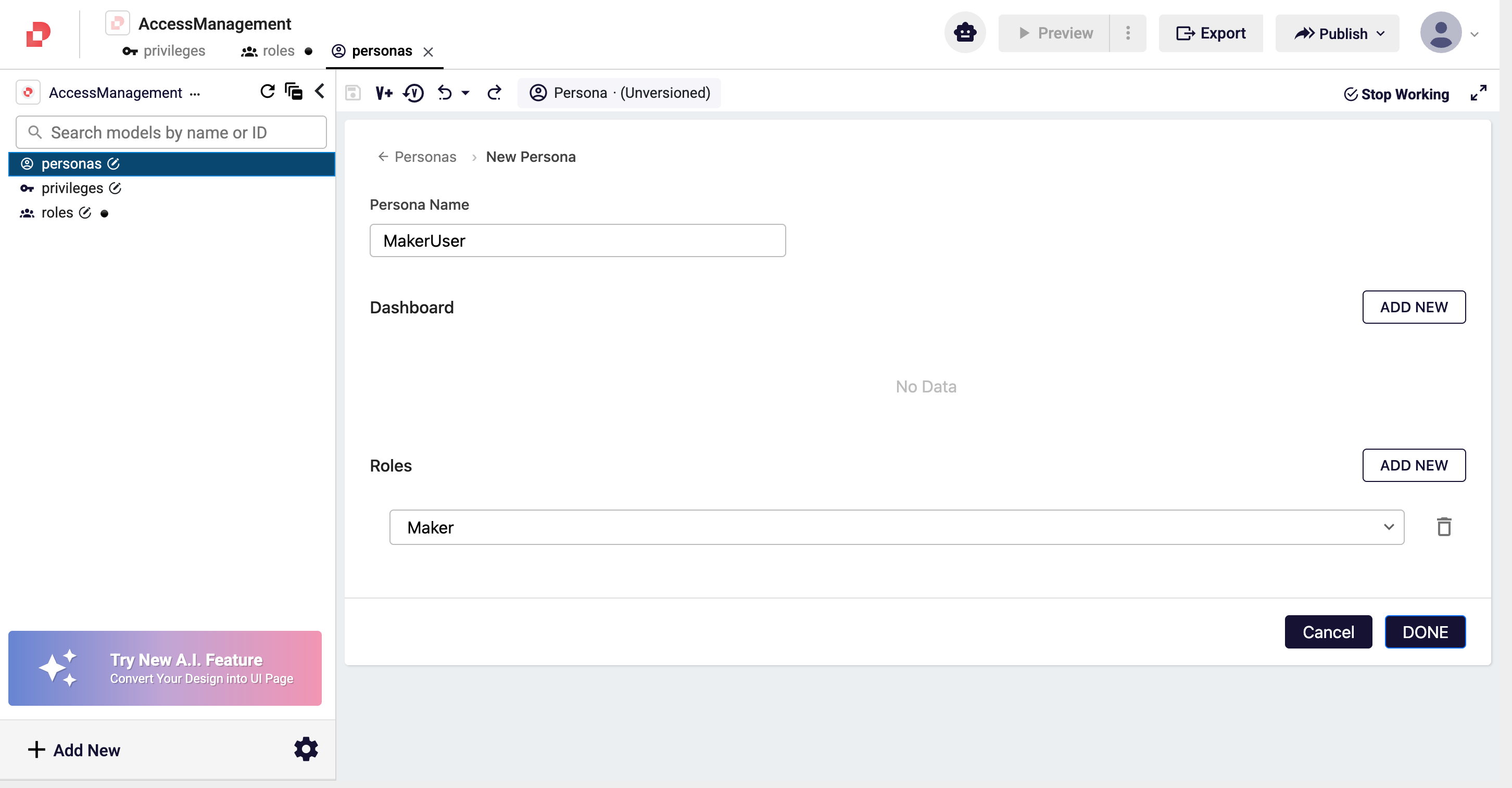
| Field | Description |
|---|---|
| Persona Name | The unique name of the persona (e.g. MakerUser). |
| Dashboard | An optional list of dashboards this persona should see. |
| Roles | The role(s) this persona carries. Use ADD NEW and pick from the Select dropdown (populated from the saved roles). Add several rows to carry multiple roles. |
info
The persona references the role; the role does not know the persona, so the same role can be reused across many personas.