Privilege Editor
The Privilege Editor is where you define privileges — the smallest units of permission in Access Management. A privilege is created from the left panel with + Add New → New Privilege.
What Is a Privilege?
- It is the smallest unit of permission. It answers a single yes/no question: "is this operation allowed?"
- It carries only a name (id) and a description — no other logic.
- On its own it does nothing; it is referenced from roles, workflows, actions and forms.
What Is It For?
- To answer "is this user allowed to do this?" with a single reusable label.
- So the same permission is defined once and referenced everywhere instead of being repeated.
- With a meaningful id (e.g.
approve_record) it is self-documenting.
Editor Layout
The editor is a table; each row is one privilege item.
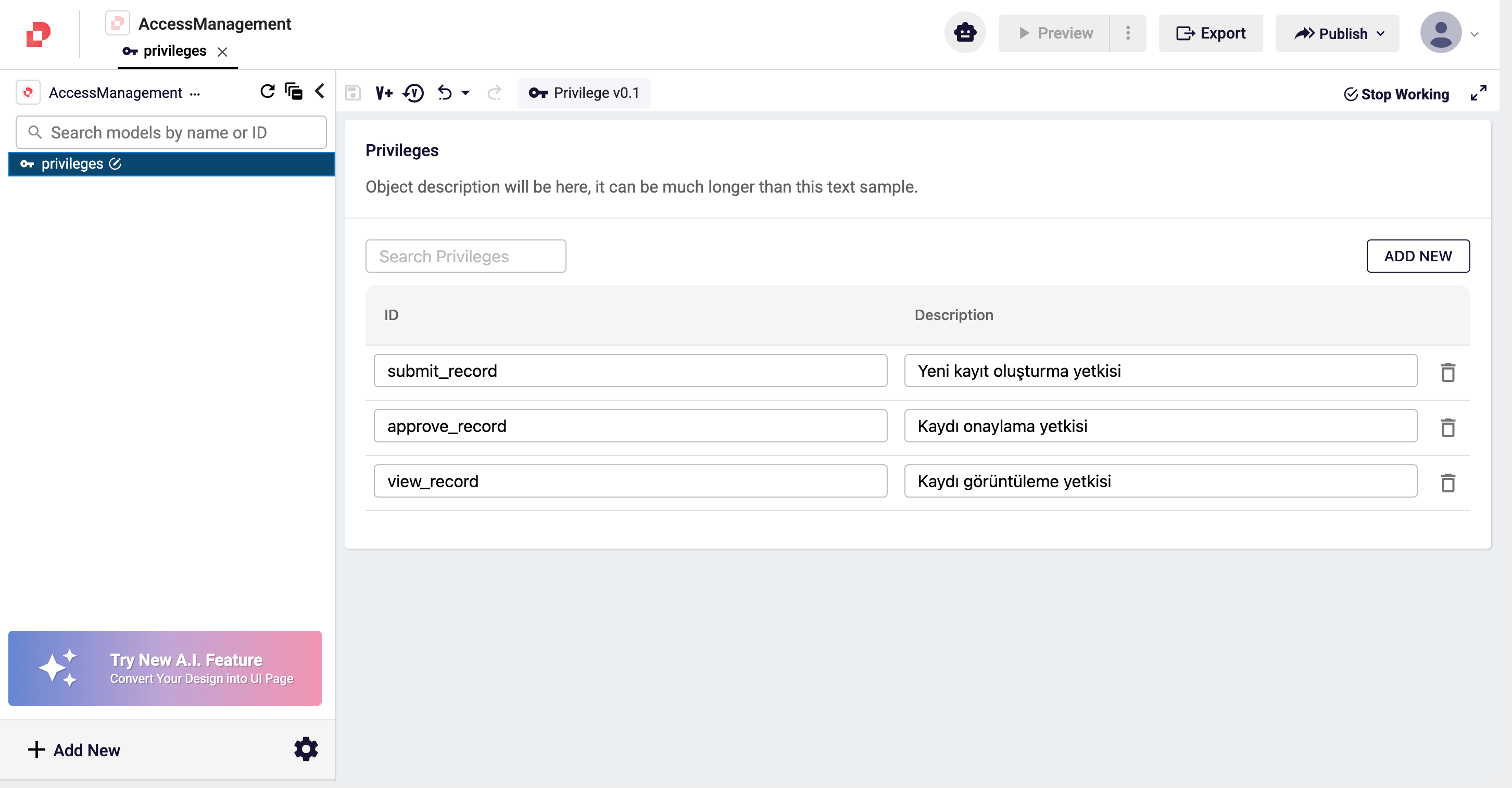
| Field | Description |
|---|---|
| ID | The unique name of the privilege (snake_case recommended, e.g. approve_record). This is what the system matches on. Renaming it breaks every reference. |
| Description | A human-readable explanation. This text appears in the selection lists throughout Studio. It is for humans only and does not affect system behavior. |
| ADD NEW | Adds a new empty privilege row. |
info
If no privilege is assigned to a resource, that resource is open to everyone — "not defined" never blocks.