SLA Editor
The SLA (Service Level Agreement) Editor is a configuration interface that enables you to define time-based SLA milestones for a User Task or for an entire Process and to automatically execute functions when those milestones are reached.
SLAs can be applied at two levels:
- User Task SLA : Executes functions based on the lifetime of aspecific user task (from task creation to completion).
- Process SLA : Executes functions based on the lifetime of the whole process instance (from process start to end).
This allows workflows to react automatically to time-based commitments, ensuring SLA rules are enforced consistently without manual intervention.
Example Usage Scenarios
A loan approval process must be completed on time; if an approval step is delayed, the responsible manager is automatically informed and the case is escalated before the customer is impacted.
A customer onboarding process has a committed completion date; if the process risks missing this date, the business owner is notified and corrective actions are triggered to meet the promise.
Editor Layout
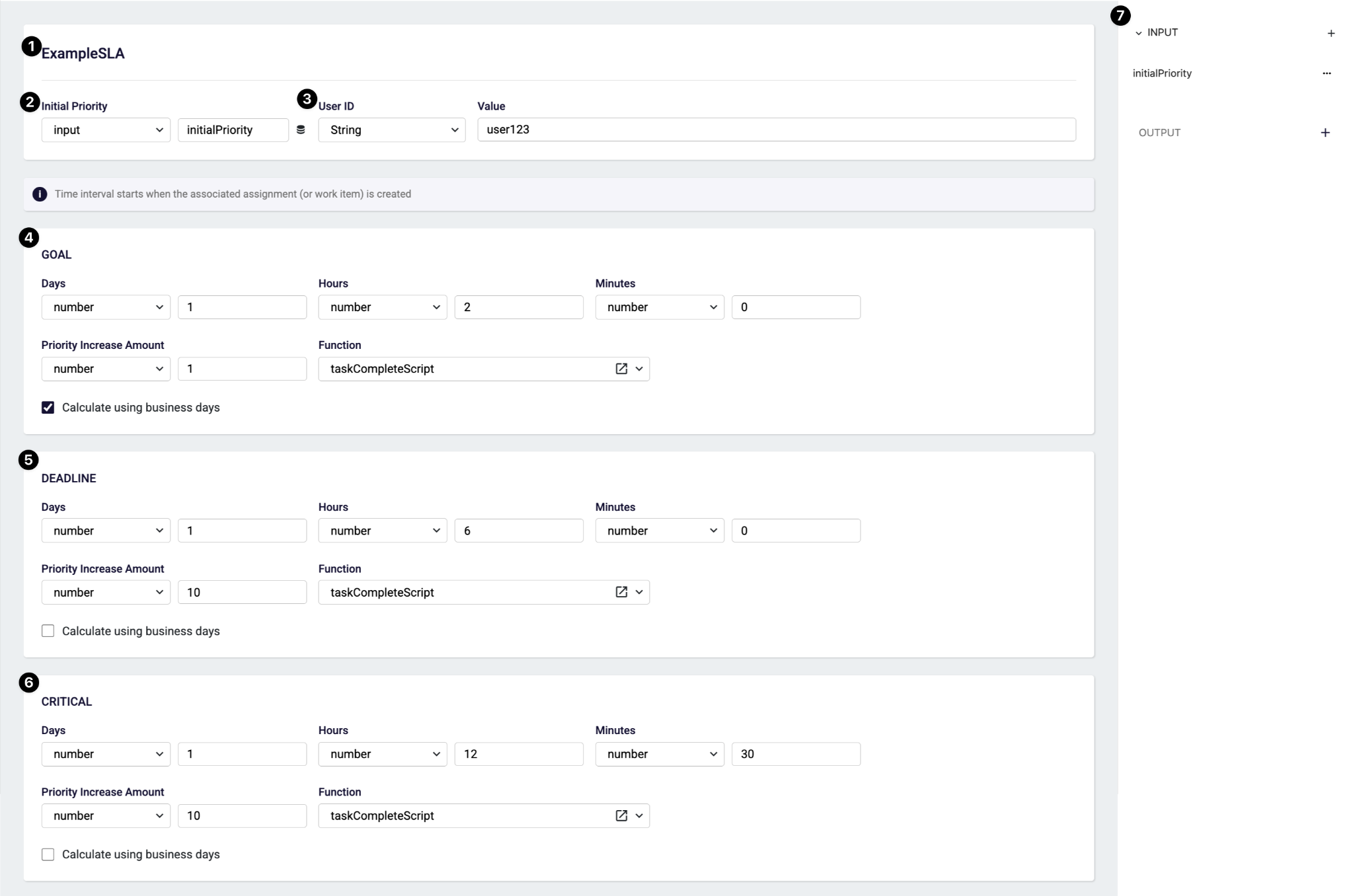
SLA Model Name (1): Defines the name of the SLA model.
Initial Priority (2): Defines the priority value assigned when the SLA starts.
- The value can be static (number)
- Or dynamically mapped from input (input)
- Or dynamically mapped from constant model (constant)
This priority may be increased automatically when SLA thresholds are exceeded.
User ID (3): When the function triggered since reached a SLA milestone, user information in the context of the function is this user.
- Type: The source of the where user id get from
- Default: Default system user is set to value
- String: Manually static user id can be set to value
- Constant: Dynamically mapped from constant model into value
Goal Section (4): The Goal defines the initial target duration.
- Days / Hours / Minutes: The time period after the SLA starts at which the Goal milestone is reached.
- Priority Increase Amount: The amount by which the priority is increased when the Goal is exceeded.
- Function: The function that is triggered when the Goal is exceeded.
- Calculate Using Business Days: Excludes weekends when calculating the milestone.
Deadline Section (5): The Deadline represents the last acceptable completion time.
- Days / Hours / Minutes: The time period after the Goal milestone is reached at which the Deadline milestone is reached.
- Priority Increase Amount: The amount by which the priority is increased when the Deadline is exceeded.
- Function: The function that is triggered when the Deadline is exceeded.
- Calculate Using Business Days: Excludes weekends when calculating the milestone.
Critical Section (6): The Critical threshold represents the highest risk level.
- Days / Hours / Minutes: The time period after the Deadline milestone is reached at which the Critical milestone is reached.
- Priority Increase Amount: The amount by which the priority is increased when the Critical milestone is exceeded.
- Function: The function that is triggered when the Critical milestone is exceeded.
- Calculate Using Business Days: Excludes weekends when calculating the milestone.
SLA Model Input and Output (7): SLA models integrate with workflows through input variables. This allows SLA behavior to remain configurable and process-aware. (Output is not used for now)
Usage Of SLA
SLAs are used in the workflow editor for workflow itself or for user tasks from their right-side configuration panel.
To see examples visit the Workflow Configurations / SLA page.