Authentication Editor
An Authentication Model, handles both Public (no-auth) and Confidential (basic authentication, oauth2) authentication at the application level for choosen API's.
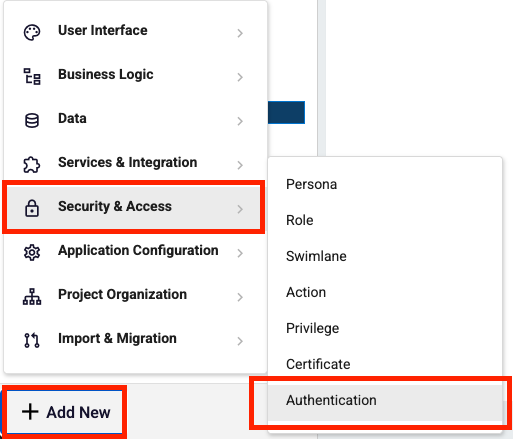
## How to create and select your Authentication Model? You can create Authentication Model via Add New -> Security & Access -> Authentication.
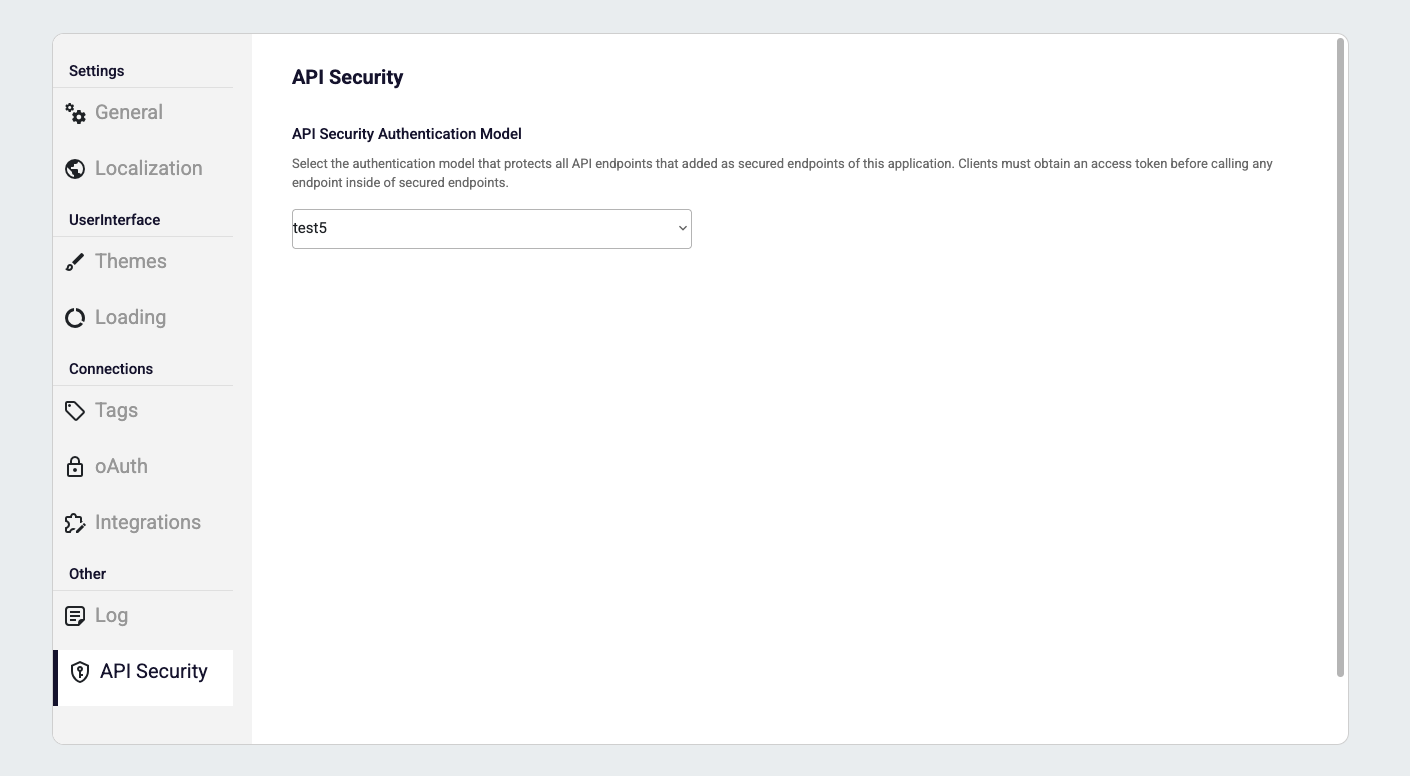
Your application checks Application Settings -> API Security to determine which rules should be applied to the selected APIs and which User Mapping Function should be executed. User Mapping function must be choosen if your application has workflow.
If you want to apply other rules on the Endpoint Models, then you can create and select specialized Authentication Model via Endpoint Model -> Middlewares -> Auth Middleware. After that you can choose your Authentication Model to apply on that endpoint.
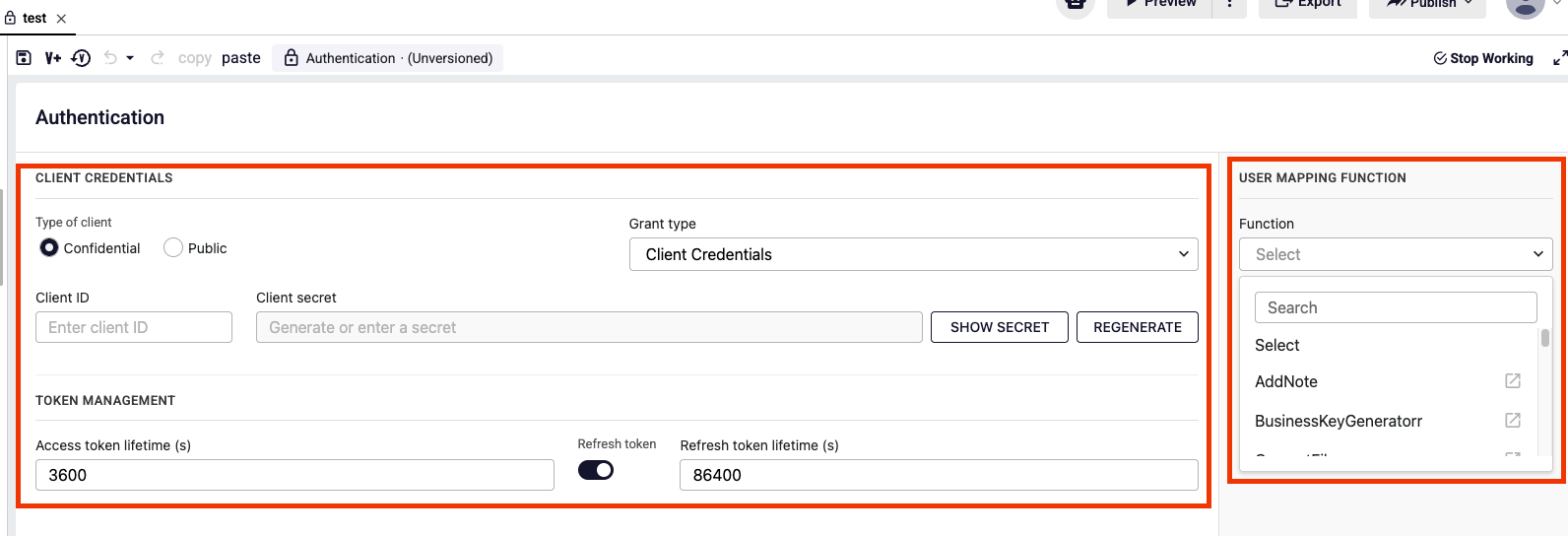
Editor Layout
| Field | Description |
|---|---|
| Type of client | Confidential: the caller must authenticate itself (basic authentication or oauth2). Public: no authentication is applied (no-auth), so Grant type is disabled. |
| Grant type | Decides how the caller proves its identity on API requests. Only one grant type can be selected: Client Credentials (oauth2) or Basic Authentication. |
| Client ID / Client secret | The credentials of the client for the Client Credentials grant. The secret is masked; it can be revealed, copied or regenerated (SHOW SECRET, COPY SECRET, REGENERATE). |
| Username / Password | The credentials used for the Basic Authentication grant. |
| Access token lifetime (s) | How long an issued access token stays valid. Default is 3600 (1 hour). |
| Refresh token | When enabled, the token endpoint also returns a refresh_token so a new access token can be obtained without sending the client secret again. |
| Refresh token lifetime (s) | How long the refresh token stays valid. Default is 86400 (1 day). |
| User mapping function | The workflow function that resolves the incoming user to a runtime user (persona, roles, privileges). It is required if your application has a workflow, because authorization is resolved from it. |
What Is a Grant Type?
Authentication (who is calling?) and authorization (what is this user allowed to do?) are handled separately. The grant type only covers the first one: it defines which credentials your API requests must carry.
| Grant type | What the client sends on every API request |
|---|---|
| Client Credentials | First a token is obtained from the token endpoint with client_id + client_secret, then the request carries Authorization: Bearer <access_token>. |
| Basic Authentication | The request directly carries Authorization: Basic base64(username:password). No token is issued, so Token management is not used. |
| (Public client) | No Authorization header is needed. |
The access token carries no user identity. The user is taken from the user header of the request and resolved by the User mapping function, so authorization stays independent from the token.
How to Select OAuth2?
- Set Type of client to Confidential.
- Select Client Credentials as the Grant type.
- Enter a Client ID and generate (or enter) a Client secret. Copy the secret before saving — it is masked afterwards.
- Set the Access token lifetime, and enable Refresh token with its lifetime if long-living clients should renew their tokens.
- Select a User mapping function if your application has a workflow.
- Save the model, then select it from Application Settings -> API Security or from Endpoint Model -> Middlewares -> Auth Middleware.
How to Select Basic Authentication?
- Set Type of client to Confidential.
- Select Basic Authentication as the Grant type.
- Enter the Username and Password.
- Select a User mapping function if your application has a workflow, then save and select the model as described above.
Since no token is issued for this grant, the Token management fields are not available.
OAuth2 Endpoints
| Endpoint | Method | Description |
|---|---|---|
/oauth2/v1/{appId}/token | POST | Issues an access token for the given application with the client_credentials grant, or exchanges a refresh_token for a new access token. |
/oauth2/v1/introspect | POST | Returns whether the given token is still active, together with its app_id, client_id and lifetime info. |
/oauth2/v1/revoke | POST | Revokes an access or refresh token. Revocation takes effect immediately on the following requests. |
/oauth2/v1/jwks | GET | Revokes an access or refresh token. Revocation takes effect immediately on the following requests. |
Getting an Access Token
The client posts its client_id and client_secret to the token endpoint of the application and receives an access token.
{
  "grant_type": "client_credentials",
  "client_id": "{{clientId}}",
  "client_secret": "{{clientSecret}}"
}
Refreshing an Access Token
If Refresh token is enabled, the client exchanges its refresh_token for a new access token instead of authenticating again.
{
  "grant_type": "refresh_token",
  "refresh_token": "{{refresh_token}}",
  "client_id": "{{clientId}}",
  "client_secret": "{{clientSecret}}"
}
Calling a Secured API with an Access Token
The access token is sent in the Authorization: Bearer header, and the user header carries the user the request acts on behalf of.
Calling a Secured API with Basic Authentication
The username and password defined in the Authentication Model are sent in the Authorization: Basic header as Base64 encoded.
Introspecting a Token
The token is posted to the introspect endpoint to check whether it is still active before relying on it.
Revoking a Token
An access or refresh token is posted to the revoke endpoint to invalidate it before its lifetime ends.